Getting set up · Step 3 of 6
Before you start
- Your PAN card
- Your name and date of birth exactly as printed on your PAN
App screens are illustrative. The securities quoted are for illustration only and are not recommendatory.
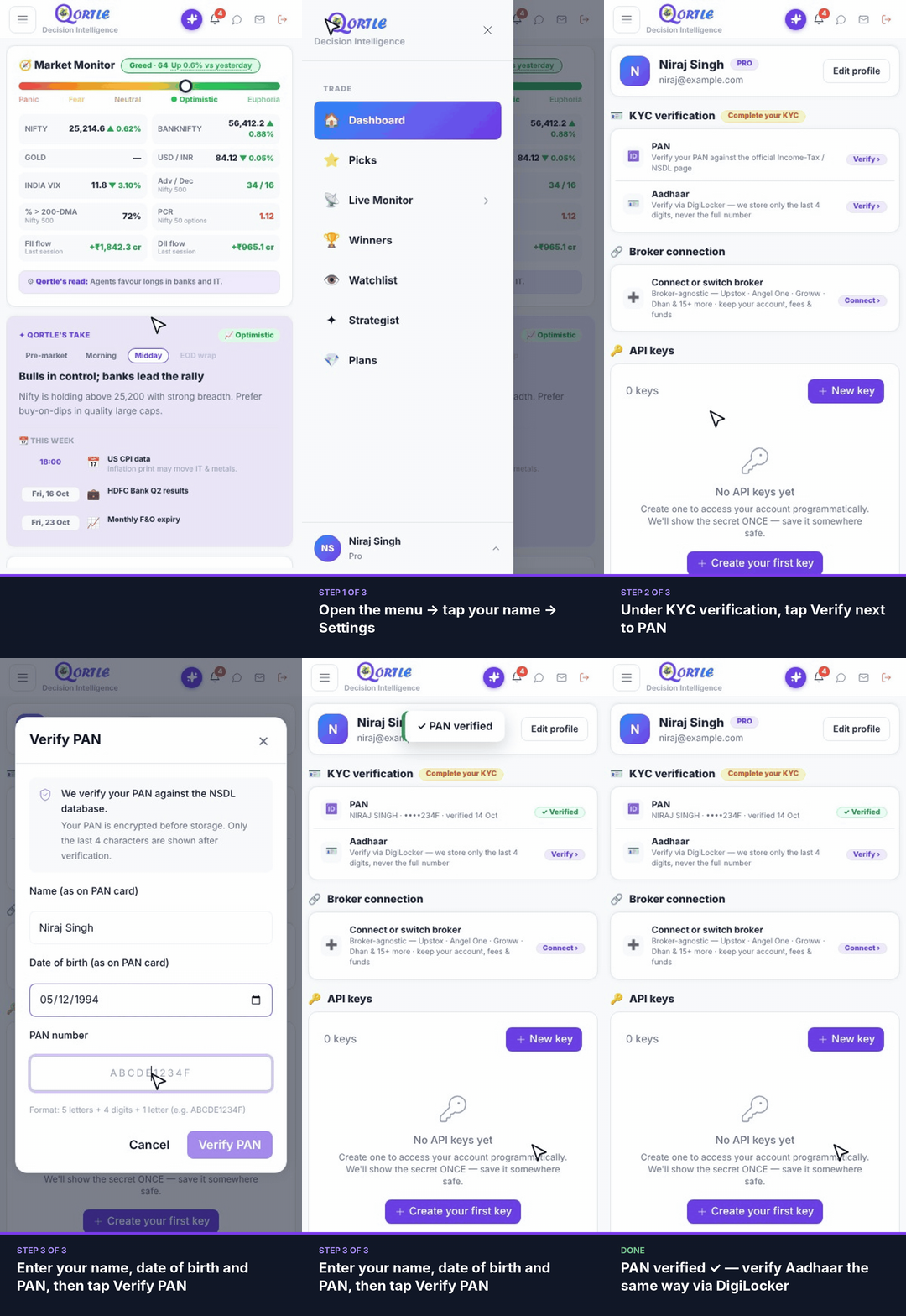
Steps
- 1Open the menu → tap your name → Settings.
- 2Under KYC verification, tap Verify next to PAN.
- 3Enter your name, date of birth and PAN, then tap Verify PAN.
PAN verified ✓ — next, verify your Aadhaar.
Good to know
What PAN format is accepted?
5 letters, then 4 digits, then 1 letter — for example ABCDE1234F.
How is my PAN checked?
We verify it against the NSDL database. Your PAN is encrypted before storage, and only the last 4 characters are shown after verification.
What's next after PAN?
Verify your Aadhaar via DigiLocker to complete your KYC.
Still need help? Raise a support query